
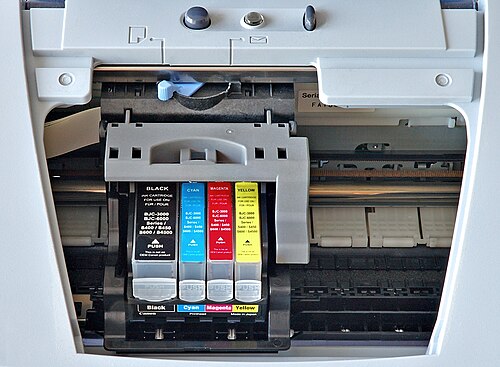
Why do printers use CMYK not RGB? Printers use CMYK because paper reflects light rather than emitting it.
CMYK stands for Cyan, Magenta, Yellow, and Black. Black has the letter K because it stands for “key plate.” In old-style printing, the key plate was the plate that carried the most detail and definition. Because most printing is done on white paper, that plate was usually black ink, and it became known as the key color. The key plate was also used to line up all of the other color plates.
CMYK might seem like an odd choice of colors to mix to make other colors. After all, eyes work perfectly well with RGB. Human eyes have cones that respond to wavelengths associated with red, green, and blue light. Those cones turn light into different electrical signals depending on how much of each type of light reaches them. The brain mixes those signals into what is perceived as a single color. For example, 100% red light, 79% green light, and 15% blue light will give the yellow of a New York taxi cab. Computer monitors also work using RGB. If the pixels on a screen emit those same percentages, the screen can make that particular yellow.
RGB works for a monitor because the light is being produced by the screen. It cannot work the same way on paper because the light is bouncing off the page instead. RGB colors are additive and CMYK colors are subtractive. RGB works by adding light. CMYK works by removing parts of the light.
When a monitor is black, it is mostly just not emitting light. As it adds more red, green, and blue light, it gets brighter. When red, green, and blue are all at full strength, the screen looks white. If you are reading this on a monitor, the white space between the words is white because the red, green, and blue subpixels are essentially at full output. The black words are black because those pixels are switched off or turned down very low.
Paper, or at least white paper, starts out bright because it reflects most visible light. A blank sheet reflects the colors of the visible spectrum fairly evenly, so it appears white. To make colors on paper, ink has to remove some of that reflected light by absorbing it. Cyan ink absorbs red light and reflects green and blue, which are seen as cyan. Magenta absorbs green light and reflects red and blue. Yellow absorbs blue light and reflects red and green. You can combine these inks in any combination to produce almost every color. Modern printers do it by putting down microdots of CMYK that overlap each other and produce the color that we are trying to print.
The more ink that goes onto the page, the more light gets absorbed and the darker the result becomes. By mixing inks in different amounts, different parts of the spectrum can be absorbed, producing a wide range of colors. If printers tried to use red, green, and blue inks as their main set, the results would tend to look too dark and dull on paper. Cyan, magenta, and yellow are lighter inks, and they are better suited to subtracting light in a controlled way from a white starting point.
In theory, combining cyan, magenta, and yellow should absorb almost all visible light and leave black. In practice, it usually produces a muddy dark brown, not a clean black, which is one reason printers also use a separate black ink. Black ink is also more efficient for text and fine detail. If all dark areas had to be made by stacking three inks, it would use more ink, be harder to keep sharp, and be more likely to smudge or look slightly blurry.
Printers have long made color images by overlaying one color on top of another. In the early 1700s, an engraver called Jacob Christoph Le Blon developed a method using three colored plates and sometimes a fourth black plate to produce colored images. In the 1890s, a CMYK-style process was used for early color printing in newspapers, including photos and comic strips. In 1906, the Eagle Printing Ink Company further improved the four-color process and is sometimes credited with helping standardize it. And this is what I learned today.
Sources
https://www.colorvisionprinting.com/blog/why-is-the-color-black-designated-by-the-letter-k-in-cmyk
https://www.jukeboxprint.com/blog/understanding-K-in-CMYK
https://printplanet.com/threads/how-many-colors-can-be-printed.10666
https://graphicdesign.stackexchange.com/questions/138943/how-many-possible-colors-in-cmyk
Image By André Karwath aka Aka – Own work, CC BY-SA 2.5, https://commons.wikimedia.org/w/index.php?curid=84651